Open Source · MIT License

Talk to your AI.
Hear it talk back.
Hands-free.

Full voice mode for Claude Code and Codex CLI, running entirely on your Mac.

macOS · Apple Silicon · No cloud APIs · Nothing leaves your machine

Download for Mac View on GitHub
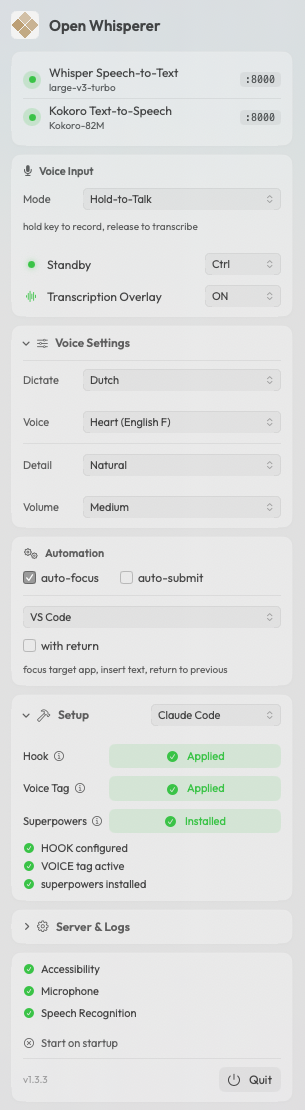
Open Whisperer menubar app

Features

Three Voice Modes

Press-to-Talk, Hold-to-Talk, or fully Hands-Free. Say "initiate" to start, silence auto-submits. Say "hold on" to interrupt.

100% Local

MLX Whisper for speech-to-text, Kokoro for text-to-speech. No cloud APIs, no data leaves your Mac. Ever.

Works with Claude Code & Codex

One-click hook setup. Auto-Focus brings your editor forward. Auto-Submit enters for you. Just talk.

17 Languages, 11 Voices

Whisper understands English, Dutch, French, German, Japanese and 12 more. Pick from 11 Kokoro voices across 8 languages.

Live Transcription Overlay

Floating window with real-time waveform, recording status, and your recent transcriptions. Always visible, never in the way.

Auto-Focus & Auto-Submit

Automatically bring your editor to the front after speaking. Auto-Submit presses Enter for you. Full hands-free workflow.

Up and running in 3 steps

1

Install

Download the DMG, drag to Applications. On first launch it sets up Python, Whisper, and Kokoro automatically.

2

Talk

Hold Ctrl and speak. Your words are transcribed locally and typed into Claude Code or Codex CLI.

3

Listen

Every AI response is spoken aloud through your speakers. See the full text, hear the summary.

Bypass Gatekeeper

Since we don't pay Apple $99/year for signing, you need to allow the app to run after installing:

xattr -cr /Applications/Open\ Whisperer.app

On first launch, macOS will ask for: